 AISBF
AISBFCoderAI turns your machines into one multimodal AI backend.
Complete orchestration, distribution and escalation of remotizable advanced inference.
CoderAI is an open source local model orchestrator with an OpenAI-compatible API, a Web Studio for generation tasks, GPU-aware model loading, and a broker client that lets AISBF route work to your machine over outbound WebSockets.
Source-backed from the CoderAI repository README, reverse-proxy docs, broker reference, and runtime config defaults.
Jump to: Why CoderAI · Full docs · Install · Docker / OCI · Packages (docker pull) · Gallery · API · Engines · RunPod · Cluster · Speech · OCR · Embeddings · Broker · Market · What it is · Scale on RunPod · Features · Bundled apps · AISBF broker · Install · API surface · Operations
See the operator UI.
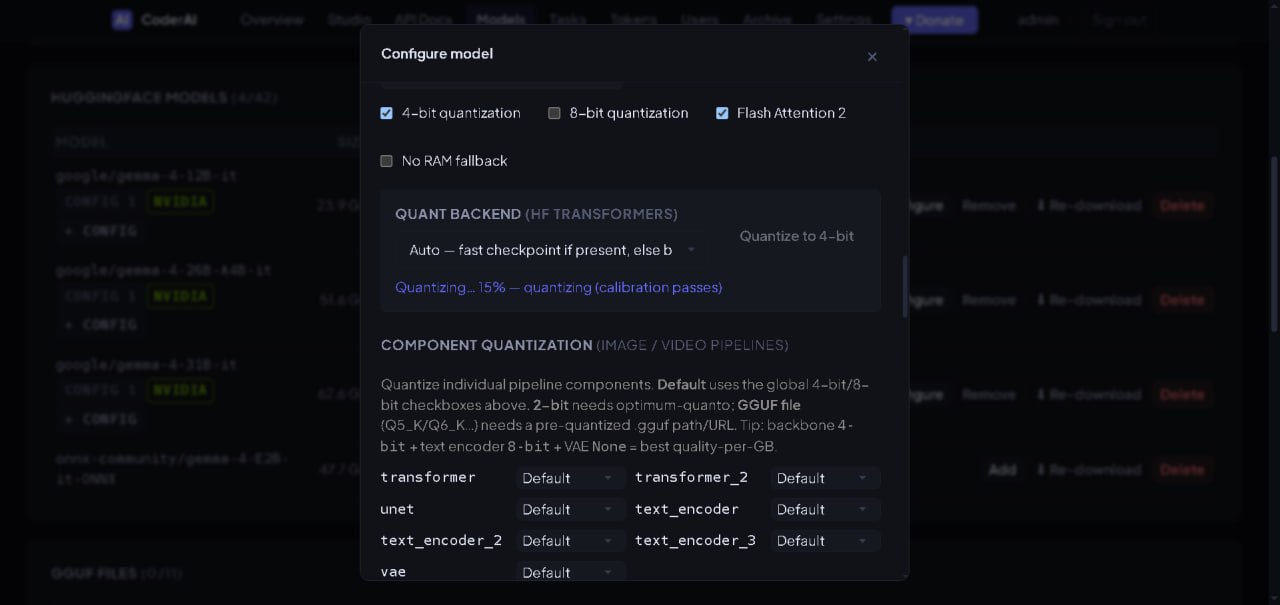
The 10-image CoderAI gallery shows the model configuration workflow: model configuration, live task monitoring, HuggingFace model discovery, active downloads, and repository detail drawers.
Model configuration screenshots
Use the 10-screenshot gallery for a quick visual tour of the model-management interface before installing CoderAI locally or connecting it to AISBF.
Local control, cloud-style API.
CoderAI is the local compute side of the stack: run models on your own GPUs, expose them through familiar HTTP routes, and optionally let AISBF treat that machine as a provider.
Drop-in API shape
It exposes OpenAI-style endpoints including GET /v1/models, POST /v1/chat/completions, completions, embeddings, image, video, and audio routes.
Browser UI for generation
The built-in Studio covers chat, image, video, audio, pipelines, archive browsing, model settings, users, tokens, and admin controls.
NVIDIA, AMD, Intel paths
CUDA, Vulkan, Metal, GGUF, Transformers, stable-diffusion.cpp, whisper.cpp, and related runtimes are handled by platform-specific build paths.
No giant CLI ceremony
Runtime state lives under ~/.coderai/: config.json, models.json, auth.json, pipelines.json, archive, and generated secrets.
Scale onto rented GPUs, per model.
Any model type — not only language models — can run on a GPU billed by the second. CoderAI picks the machine, boots it, serves the model on it, and destroys it when nobody is using it. Placement is decided per model, so the same capability can be local for one model and rented for another.
Stay on your card
The default. A model runs on the GPU you own and queues behind the work already there. Nothing leaves the machine.
Spill when busy
Local stays primary; a request spills to a rented pod only when the local queue is full or no local GPU can serve it. The overflow costs money, the steady state does not.
Always remote
For a model too large for your hardware, or one you would rather not hold on disk. The weights never touch local storage.
Every capability, every engine
Images, video, speech, transcription, OCR, embeddings, voice, face swap — and llama.cpp, vLLM and the native MoE engines as CoderAI pods, compiled for every GPU generation. Public on GHCR, pulled without credentials.
No proxy in the way
A CoderAI pod is reached at its public ip:port over a certificate it brings itself, signed by your install’s own CA — no 100-second proxy cutoff, nothing in clear on the wire.
Pools that grow and shrink
A pool adds pods as concurrent requests climb, load-balances across them with session affinity so a conversation keeps its cache, and tears each one down after a configurable idle time.
A GPU you forgot cannot bill you
Per-model and global $/hr ceilings, cumulative budgets on a persistent ledger, and a reaper that terminates any pod carrying this deployment’s tag that is not in a live pool — including after a crash.
Proven on live hardware
Sixteen of the nineteen images have completed a real request on a rented GPU on the current build — an SDXL image, a video clip, a chat completion from a GGUF and from vLLM, a voice clone over direct TLS, a diarisation, an OCR read checked against the words on the page — for fractions of a cent per test. The three that have not need real faces or a hundred gigabytes of weights first, and are labelled as such.
Several machines as one CoderAI.
Other installs on your network become engines of one front. One model too big for any machine spreads over their cards. The work of one request spreads over every card that has the model. A LoRA trains on all of them at once. Placement is per model, and the form refuses a pair that cannot work.
Cluster nodes
Another CoderAI, one API token: polled, assigned models, pinned by name, routed by capability and load; its own front picks the card. Load and unload reach it; the Cluster page shows every node's engines, VRAM and reachability.
One GGUF over machines
llama.cpp RPC: a machine lends its cards, a model names them, the layer split spreads over local and remote cards alike. Bundled RPC-enabled llama.cpp and rpc-server from the same tree.
vLLM on Ray, SGLang nnodes
Tensor parallel inside a machine, pipeline parallel across them; CoderAI starts the head, runs each node's command, waits for the GPUs, launches, tears down. The vLLM pod image joins as a Ray worker.
Every capability, fanned out
n images or videos, embedding and rerank lists, speech by sentences, transcriptions cut at silences, OCR batches — split over every engine and node that has the model, merged back into one answer.
Pipeline parts elsewhere
Text encoder, the Wan 2.2 low-noise expert and the VAE each on a named node: prompt embeddings and latents are what cross the wire; the node finishes the video.
LoRA on every card you own
Data-parallel LoRA/QLoRA training over torch.distributed: adapter gradients averaged every step, rank 0 saves, peers keep nothing. Fine on 1 GbE — the adapter is a few MB.
One token, mDNS, done
Type the same cluster token on every box and tick discovery: installs announce themselves as _coderai._tcp, members find each other and join as nodes — no URLs, no per-node tokens.
Prefix-cache aware
A conversation's next turn goes back to the engine or node that served it, where its KV cache is warm, when the model is loaded in several places.
Metrics, logs, signed images
/metrics for Prometheus with usage per API key, model and engine; every node's log tail from the head; a node that restarts gets its models pushed again; every published image cosign-signed.
Built for more than chat.
The repository describes CoderAI as a multimodal orchestrator, not only an LLM server. The useful bit: one local control plane for many heavy generation jobs.
Text and embeddings
Chat completions, text completions, streaming, prompt caching, tool calling, per-model context and quantization. Embeddings cover text, images, multi-vector BGE-M3, geolocation and place recognition, plus cross-encoder reranking at /v1/rerank. More →
Images
Text-to-image, image editing, inpainting, upscaling, deblur, unpixelate, outfit change, face swap, depth, segmentation, and 2D/3D conversion.
Video
Text-to-video, image-to-video, video-to-video, frame interpolation, upscaling, subtitles, dubbing, lip sync via Wav2Lip or SadTalker, and 3D video processing.
Audio and speech
Kokoro TTS, F5-TTS voice cloning, Seed-VC conversion, MusicGen/AudioGen/AudioLDM2, Demucs stem separation. Transcription picks its engine per model — whisper.cpp, CrisperWhisper, Wav2Vec2, Vosk or NVIDIA NeMo — with word timestamps, translation, diarization and enrolled speaker identification. More →
Many inference engines
Each model picks its runtime: Transformers, llama.cpp GGUF, ds4, colibri, kimi-k3-in-c, ktransformers/SGLang or vLLM — so a frontier-size mixture-of-experts model can stream off disk on hardware that could never hold it. More →
Rented remote GPUs
Any model type — not only language models — can be served on a RunPod GPU billed by the second: ten trimmed capability images, price and VRAM caps, spend budgets, idle teardown and a reaper that kills pods nobody is using. Placement is per model, so one video model can stay local while another rents a card, or bursts to one only when the local GPU is busy. RunPod → Remote execution →
Document OCR
PaddleOCR, docTR and Surya behind /v1/ocr: text with bounding boxes, layout and tables, schema-driven structured extraction, and stamp/signature detection. More →
LoRA training
Train image or video LoRAs on your own GPU — or on every machine of your cluster at once — from the API or the UI, from a saved character profile or uploaded images: non-blocking, resumable, and scheduled so a concurrent load cannot OOM the trainer.
Profiles
Character profiles and environment profiles preserve visual identity and scene style across image/video generation. The README documents up to six of each per generation.
Pipelines
Built-in and custom pipelines chain steps like text → image → video → TTS. Template variables include {{input}}, {{stepN.output}}, and {{stepN.url}}.
Bundled example applications.
CoderAI is not only an API server. The source tree includes three practical demo/example web applications under tools/ — video_editor.py, videogen.py, and gen_township_fighters.py — and the Docker / OCI image starts them behind the same published port.
Video editor
A browser-based editor backed by CoderAI TTS and local ffmpeg. Pick or upload video, scrub a timeline, generate narration, place clips at exact positions, add music, speed up regions, and render the final result.
OCI route: /editor/
VideoGen studio
A small web app for managing character and environment profiles, assembling multi-clip short movies, and chaining image/video generation, speech, lip-sync, music, and sound effects through the CoderAI API.
OCI route: /videogen/
Township fighters demo
An example generator for fighter-match videos in an MMA-style workflow: generate characters, environments, and fight clips through CoderAI, then save the produced media under the container cache/output paths.
OCI route: /township/
The AISBF connection.
CoderAI does not need AISBF to work. Use CoderAI standalone for local generation, the browser UI, and direct OpenAI-compatible API calls. Add AISBF only when you want brokered routing, metering, clustering, or shared access to that local capacity.
CoderAI can also be a first-class AISBF provider. Direct HTTP works on a LAN/server. Broker mode is for machines behind NAT: CoderAI dials out, AISBF routes in.
Broker config in CoderAI
{
  "broker": {
    "enabled": true,
    "base_url": "https://aisbf.cloud",
    "scope": "user",
    "username": "alice",
    "provider_id": "coderai-local",
    "client_id": "workstation-01",
    "registration_token": "your-provider-token",
    "transport": "websocket"
  }
}
AISBF provider shape
{
  "type": "coderai",
  "endpoint": "http://127.0.0.1:8776",
  "api_key_required": false,
  "coderai_config": {
    "broker_enabled": true,
    "broker_preferred": true,
    "client_id": "workstation-01",
    "registration_token": "provider-scoped-secret"
  }
}
Important broker rule
The broker identity must match on both sides. Keep provider_id, client_id, username, and registration_token stable. If AISBF sees the session but requests do not route, the first thing to check is usually a mismatched client_id or owner scope.
Sell access to local models through AISBF.
CoderAI broker mode is the local-model seller path: your machine dials AISBF, registers what it can run, and AISBF exposes that capacity through controlled provider routes.
Keep the GPU local
Run CoderAI on your workstation, home lab, private server, or rented GPU. The broker uses outbound WSS, so the worker does not need a public inbound port.
Advertise real capability
CoderAI can report hardware, endpoints, and model/media capabilities so AISBF can route buyers to the right worker.
Let AISBF manage access
AISBF sits in front for identity, tokens, quotas, routing, failover, and the market/access layer instead of exposing your raw CoderAI API.
Install and run.
The README’s quick start builds all backends, starts the server on localhost, then opens the admin UI. Default credentials are admin / admin and should be changed immediately.
Linux quick start
git clone git@git.nexlab.net:nexlab/coderai.git
cd coderai
./build.sh all
source venv_all/bin/activate
python coderai
Default server: http://127.0.0.1:8776
Container install: run the provided Docker / OCI image with coderai-docker and persistent /config, /models, and /cache volumes. Download the ready-to-use Docker install bundle →
Access points
/admin— admin dashboard/chat— Web Studio/v1/*— OpenAI-compatible API/docs— interactive FastAPI docs
API surface.
CoderAI presents a broad set of generation endpoints while keeping OpenAI-compatible routes for the common integration path.
Core OpenAI-style
GET /v1/modelsPOST /v1/chat/completionsPOST /v1/completionsPOST /v1/embeddings
Image and 3D
/v1/images/generations/v1/images/edits/v1/images/faceswap/v1/3d/generate
Video
/v1/video/generations/v1/video/dub/v1/video/interpolate/v1/video/to3d
Audio
/v1/audio/speech/v1/audio/transcriptions/v1/audio/clone/v1/audio/convert
Speech & speakers
/v1/audio/diarization/v1/audio/speakers/v1/audio/speaker-identify/v1/audio/stems
Documents & vectors
/v1/ocr/v1/ocr/schemas/v1/embeddings/v1/rerank
Training
/v1/loras/train/v1/loras/progress/v1/loras/upload/v1/pipelines/custom
Operational shape.
CoderAI is designed like local infrastructure: model registry, request queueing, on-demand loading, offload rules, archive retention, auth, tokens, and reverse-proxy support.
Resource management
On-demand loading, idle unload, VRAM → RAM → disk offload, per-model settings, request queues, prompt cache reuse, and optional prompt aggregation.
Frontend/engine split
A torch-free front proxy supervises one engine subprocess per GPU, so the UI stays responsive while a worker is loading or generating. Engines bind localhost only and are reached through an internal token.
Sharing a card safely
Every backend — external engines, OCR and STT workers included — is VRAM-eviction tracked. A host-RAM ceiling, a thermal supervisor that can pause a cooking engine, and a swap gate that batches requests before handing a shared GPU over keep multi-tenant machines from thrashing.
Reverse proxy ready
The repo documents subdomain/root mounting and /coderai/ sub-path mounting using X-Forwarded-Prefix, long timeouts, large uploads, and disabled buffering for SSE.
Open source
CoderAI is GPLv3, authored by Stefy Lanza, with contributions via merge requests on Nexlab GitLab.